
How Face Mapping and AI Help You Find Your Best Brow Shape

Choosing a brow shape usually goes one of two ways: you find a picture of someone's brows you like, or you trust your artist's eye. Both can work. But neither tells you whether a shape actually suits your face — your bone structure, your proportions, the natural geometry that makes your features yours.
That's the gap we set out to close. We built two tools — a Brow Shape Analyzer and an AI Visualizer — that use face mapping and generative AI to take the guesswork out of brow design. They're free, they run in your browser, and they're unlike anything else available in Edmonton.
The Quick Version
- Your face shape determines which brow shapes balance your features. Oval faces work with almost anything; round faces benefit from higher arches; square faces need softer angles.
- Our Brow Shape Analyzer maps 468 points on your face to classify your face shape, measure your brow geometry, and recommend services based on what it finds.
- Our AI Visualizer generates realistic previews of how specific brow and lash styles would look on your actual face — before you book anything.
- Both tools are free, instant, and private. The analyzer runs entirely in your browser. No photos are stored.
Why Face Shape Matters for Brow Design
Every face has proportions — ratios between forehead width, cheekbone width, jawline width, and face length. These ratios determine your face shape, and your face shape determines which brow styles create visual balance.
This isn't opinion or trend. It's geometry. A high arch on a long, narrow face can elongate it further. A flat brow on a round face adds width where you don't need it. The right brow shape works with your bone structure instead of against it.
Professional brow artists learn to read face shapes by eye over years of practice. We asked the question: can we make that assessment faster, more precise, and accessible to anyone with a phone?
The Six Face Shapes and Their Ideal Brow Partners
Here's how face shape maps to brow shape — and why:
| Face Shape | Key Feature | Best Brow Shape | Why It Works |
|---|---|---|---|
| Oval | Balanced proportions, slightly narrower at jaw and forehead | Soft angled arch | Maintains natural balance without adding length or width |
| Round | Similar width and length, full cheeks | High arch, defined angle | Vertical lift counteracts width, creates definition |
| Heart | Wider forehead, narrow chin, prominent cheekbones | Soft, rounded arch | Reduces the visual weight of the forehead |
| Square | Strong jawline, forehead and jaw roughly equal width | Thick with a soft curve | Softens angular features, contrasts the straight jawline |
| Oblong | Longer than wide, even proportions top to bottom | Flat to low arch | Adds width visually, prevents the face from appearing longer |
| Diamond | Narrow forehead and jaw, wide cheekbones | Curved, rounded shape | Softens prominent cheekbones, fills narrow forehead area |
This is what our Brow Shape Analyzer calculates for you — automatically, from a single photo.
How the Brow Shape Analyzer Works
When you upload a selfie to our Brow Shape Analyzer, here's what happens under the hood:
Step 1: Facial Landmark Detection
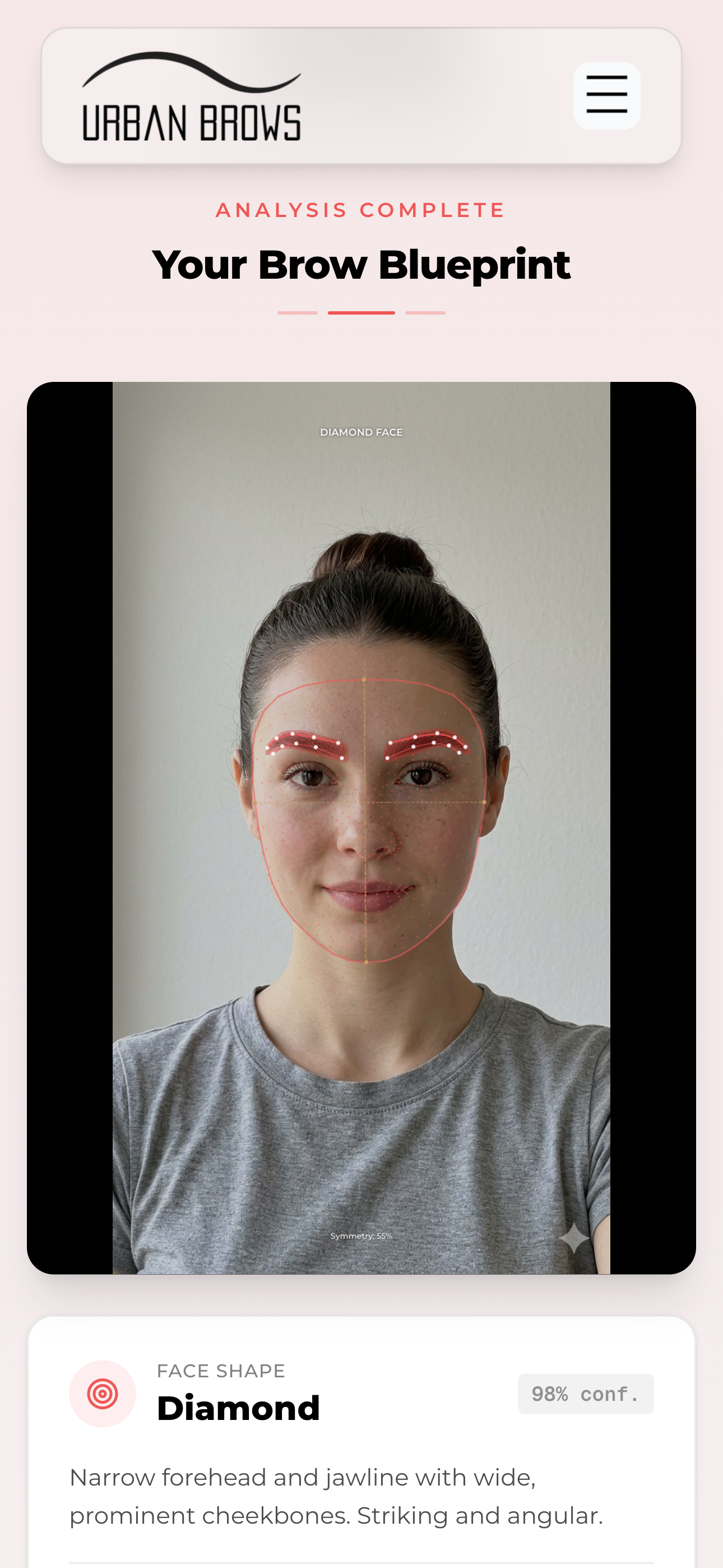
The tool loads a machine learning model called MediaPipe FaceLandmarker, developed by Google. It identifies 468 specific points across your face — along your jawline, cheekbones, forehead, nose, eyes, and brows. All of this runs locally in your browser. Your photo never leaves your device for this step.
Step 2: Face Shape Classification
Using the landmark positions, the analyzer calculates a set of ratios:
- Forehead-to-cheekbone width — how your forehead compares to the widest part of your face
- Cheekbone-to-jaw width — whether your face narrows significantly at the jaw
- Face length-to-width ratio — whether your face is longer than it is wide
- Jaw angle — whether your jawline is angular or rounded
These ratios feed into a classification algorithm that determines which of the six face shapes — oval, round, heart, square, oblong, or diamond — best matches your geometry. It also produces a confidence score so you know how strong the match is.
Step 3: Brow Geometry Analysis
Separately from face shape, the analyzer measures your existing brows directly:
- Arch height — how high your brow peaks relative to its baseline
- Arch position — where the highest point falls (inner third, middle, outer third)
- Thickness — how wide the brow band is
- Tilt angle — the overall upward or downward slant
- Tail length — how far the brow extends past the outer corner of your eye
- Symmetry — a 0-100 score comparing left and right brow alignment
This tells you not just what shape your face is, but what your brows are actually doing right now — and where there's room to adjust.
Step 4: Personalized Recommendations
Based on your face shape and brow measurements, the analyzer recommends specific services. Someone with sparse, flat brows on a round face might see henna brows and brow lamination suggested. Someone with thick, well-shaped brows on an oval face might get a recommendation for brow sculpting to maintain and refine what they already have.
These aren't random suggestions. They're mapped to the relationship between your facial geometry and what each treatment does best.
The AI Visualizer: See Styles on Your Face Before You Book
Knowing your face shape is useful. Seeing how a specific treatment would look on you is something else entirely.
Our AI Visualizer lets you upload a photo and generate realistic previews of six different brow and lash styles:
- Brow Sculpting — clean, defined, threaded shape
- Brow Lamination — fluffy, brushed-up, full coverage
- Henna Brows — bold, filled-in, makeup-like finish
- Classic Lashes — subtle, natural-looking length
- Volume Lashes — full, dramatic, dense coverage
- Hybrid Lashes — texture and depth, a mix of classic and volume
How the Visualizer Works
- Upload a photo. The tool validates that your face is front-facing, well-lit, and high enough resolution to produce a good result.
- Pick a style. Choose from the six available options.
- AI generation. An AI segmentation model isolates your brow or lash area with pixel-level precision. A separate generative model then produces a photorealistic preview of the selected style applied to your face.
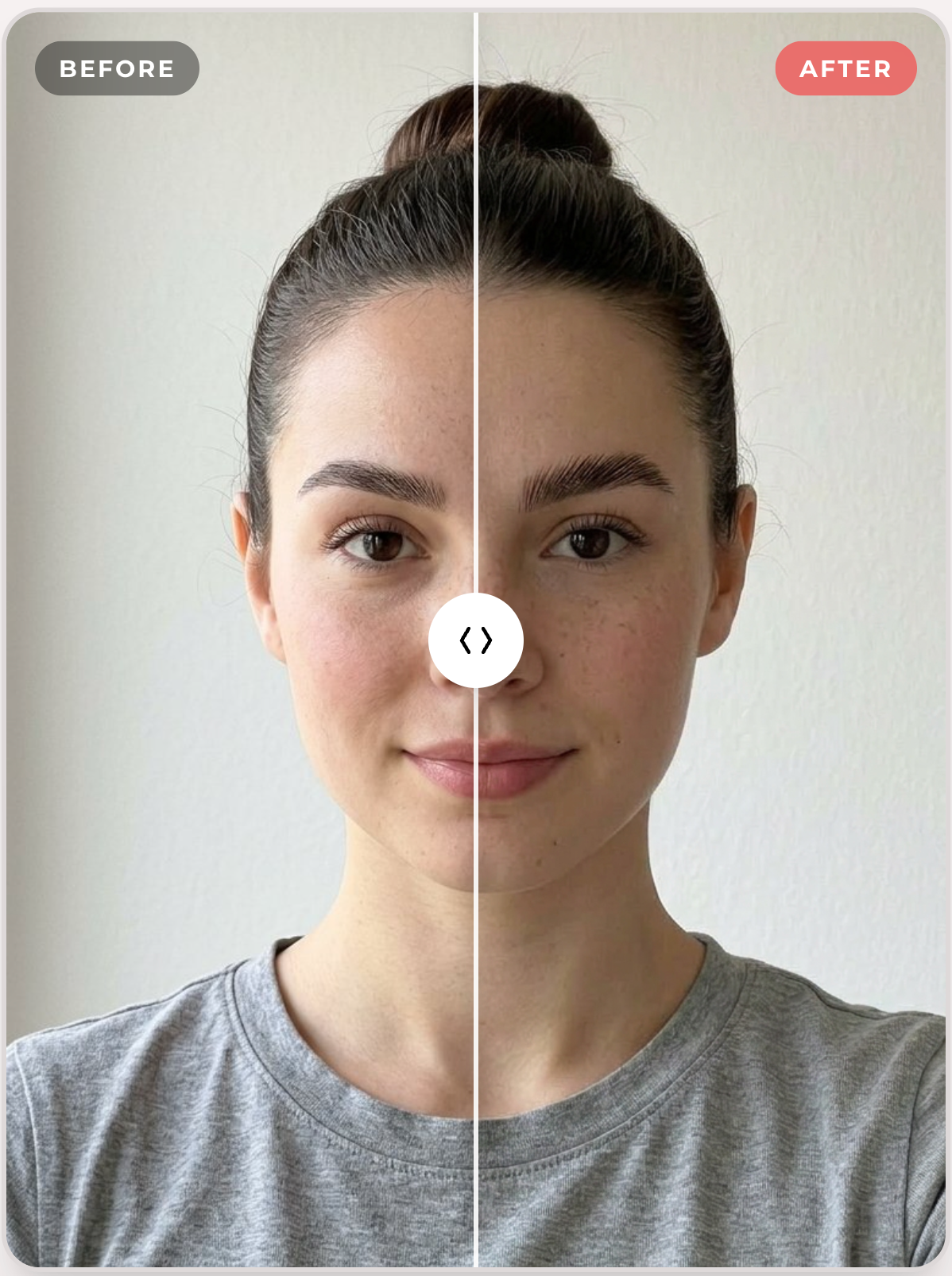
- Compare. View your results side-by-side with the original using an interactive before-and-after slider.
The generation takes about 30 to 60 seconds. You can try multiple styles without re-uploading — the tool caches your image data so subsequent generations are faster.
What the Visualizer Does Not Do
The visualizer shows you a direction, not a promise. Real brow and lash treatments interact with your natural hair, skin, and features in ways that generative AI can approximate but not perfectly replicate. It's a reference tool — a way to walk into your appointment with a clearer picture of what you want, not a guarantee of pixel-perfect results.
Your artist will always assess your hair, skin, and goals in person before beginning any treatment.
Why We Built This
Most salons in Edmonton — and most salons anywhere — rely on consultation alone. That consultation is valuable. Our artists have shaped thousands of brows and their judgment is irreplaceable. But we noticed a recurring pattern:
Clients didn't know what to ask for.
Not because they lacked taste, but because brow design is difficult to visualize. You can look at someone else's brows and love them, but you can't know how they'd look on a different face. You can describe what you want, but "a soft arch" means different things to different people.
These tools exist to bridge that gap. When you arrive for your appointment knowing your face shape, understanding why a particular brow style works for your proportions, and having seen a preview of the result — the conversation with your artist starts in a completely different place.
It's technology in service of the relationship between you and your brow artist. Not a replacement for it.
What This Means for Your Appointment
If you use the analyzer or visualizer before booking, here's what changes:
- More productive consultations. Instead of starting from scratch, your artist can build on what you've already discovered about your face shape and preferences.
- Faster alignment. You've seen a preview. Your artist has seen thousands of real results. The overlap between those two perspectives gets you to the right outcome faster.
- Greater confidence. Committing to a new brow treatment is easier when you've already seen a version of how it might look on your actual face.
You don't need to use the tools before booking — plenty of our clients walk in without them and leave happy. But if you're someone who likes to research, understand, and preview before committing, they're built for you.
Privacy and Your Photos
We know this matters, so here's the direct answer:
- The Brow Shape Analyzer runs entirely in your browser. Your photo is processed locally using your device's own computing power. It's never uploaded to our servers for this analysis.
- The AI Visualizer does upload your photo to generate the preview, because the generative model runs on cloud infrastructure. Your image is used only to produce your result and is not stored, shared, or used for any other purpose.
- No account required. You don't need to log in, provide your email, or create a profile to use either tool.
Try It Yourself
Both tools are free and available right now:
- Brow Shape Analyzer — Upload a selfie, get your face shape analysis and brow measurements in seconds.
- AI Visualizer — See how different brow and lash styles look on your face before you book.
If what you see gets you excited about your next appointment, we're here. Book online at any of our Edmonton locations, or bring your analyzer results to your next consultation — your artist will know exactly what to do with them.
Frequently Asked Questions
Is the Brow Shape Analyzer accurate? The face shape classification uses the same landmark detection technology found in medical and research applications. It's reliable for determining face shape categories. That said, beauty is subjective — the recommendations are a starting point, not a rigid prescription. Your artist may suggest variations based on factors the algorithm doesn't capture, like your personal style, hair growth patterns, or lifestyle.
Do I need a specific type of photo? A front-facing selfie with even lighting and your hair pulled back works best. Both tools validate your photo before processing — if the angle, resolution, or lighting isn't right, you'll get specific feedback about what to adjust.
How is this different from social media AR filters? Filters overlay pre-made graphics on your face. Our visualizer generates a unique, photorealistic image based on your actual features and the specific treatment style. The output isn't a sticker — it's a rendered approximation of a real result.
Can I share my results? Yes. The analyzer generates a results summary you can download or share directly. The visualizer produces before-and-after images you can save to your device.
Does every Urban Brows location offer the recommended services? Yes. All our Edmonton locations offer our full menu of brow and lash services. View our locations to find the one nearest to you.
What if the analyzer says my face shape is one thing, but I think it's another? Face shape exists on a spectrum. Many people have features that blend two categories — and the confidence score reflects that. If your result feels off, you may be between two shapes. Your brow artist can give you a more nuanced assessment in person, factoring in your hairline, glasses, and how you typically style your brows.